
There is a lot of talk about artificial intelligence right now. Every industry seems to be figuring out what it means for them. Engineering and design are no different. In 2026, the shift is no longer just a trend. It has become the standard for modern firms.
CAD tools have been improving steadily for decades. We have seen better graphics, faster processing, and smarter simulation. But what is happening now feels like a bigger shift than just small improvements. AI is not just making existing tools faster. It is starting to change what CAD tools can actually do. It is also changing what designers spend their time on every day.
This post looks at where things stand right now. We will explore what AI-driven CAD tools are capable of today and the key software features leading the market. We will also talk about what all of this means for the people who use these tools for their career.
How AI Is Actually Getting Into CAD Software
It helps to be clear about what we mean when we say AI in CAD. It is not just one single thing. It is a collection of different technologies that work together to simplify the design process. Some of these tools are already inside the software you use. Others are still being tested in research labs.
The following technologies are the foundation of modern CAD:
- Machine Learning (ML): This is where software learns patterns from huge amounts of data. It uses these patterns to provide predictions or suggestions while you draw.
- Optimisation Algorithms: These explore thousands of design variations automatically. They find the best version based on the goals you set.
- Computer Vision: This helps software understand what it is looking at in an image or a 3D scan. This is what makes reverse engineering much faster.
- Natural Language Processing (NLP): This lets designers describe what they want in plain language. You can type commands instead of clicking through endless menus.
Generative Design: From Concept to Industry Standard
Generative design is probably the most talked-about AI application in CAD right now. It has been around long enough that there are real-world examples in aerospace, automotive, and medical device design.
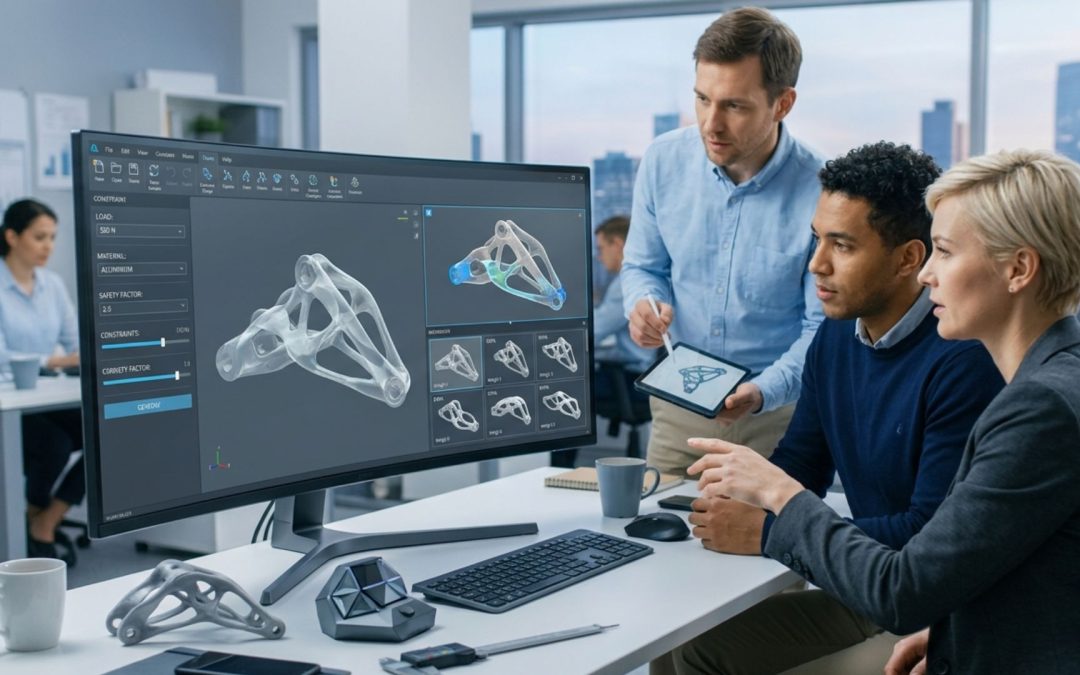
The basic idea is simple. Instead of designing a shape manually, you define what the design needs to do. You set the rules or constraints. You tell the software where the weight will be and how much force it needs to handle. You also choose the materials and specify if the part will be 3D printed or CNC machined.
The software does not generate just one option. It generates dozens or even hundreds. Each one represents a different way to solve the same problem. The designer then looks through these options and decides which ones are worth developing further. This allows a human to explore thousands of ideas in a fraction of the time it would take to draw them by hand.
Key Benefits of AI-Powered Generative Design
While the software does the heavy lifting, the human designer remains the decision maker. Here are the main reasons firms are adopting this technology:
- Organic Shapes: It produces forms that look skeletal or irregular. These are often shapes a human would never think to draw.
- Material Efficiency: It creates parts that are very strong but use far less material. This saves money and reduces waste.
- Faster Innovation: It can explore design options in minutes that would usually take a team of engineers several weeks.
- Industry Integration: Major platforms like Fusion 360 and Autodesk have built these tools directly into their standard workflows.
AI-Assisted Drafting and Geometry Suggestions
A more immediate and widely used part of AI is at the drafting level. Some tools are starting to suggest geometry as you work. Think of it like autocomplete for your phone, but for shapes and mechanical parts. Design tasks that involve a lot of repetition make up a huge part of a drafter’s day. AI is now taking over these boring tasks so you don’t have to.
For example, AutoCAD 2026 uses machine learning for its “Smart Blocks” feature. The software can automatically place blocks based on where you have put them before. It can even suggest replacements for old blocks. If you place a bolt on one side of a flange, SOLIDWORKS can suggest placing them on all the other sides automatically. This sounds like a small change, but it speeds up the drafting process and keeps things consistent.
Natural Language Interfaces for CAD
This is one of the more recent developments in 2026. The traditional way of using CAD involves menus, toolbars, and a lot of muscle memory. It takes a long time to become an expert. Natural language interfaces aim to change this by letting you use plain English.
Instead of searching for a tool in a menu, you just ask for it:
- “Add a 5mm chamfer to all external edges.”
- “Create a mounting boss on the back face with an M6 thread.”
- “Mirror this feature across the vertical axis.”
- “Check this design for any parts that are touching or overlapping.”
Tools like Autodesk Assistant and PTC Creo are leading the way here. These features work best for common tasks right now. They might struggle with very complex or vague requests. However, the direction is clear. As these systems get better at understanding intent, they will become a natural part of how designers work.
AI for Error Detection and Design Validation
One area where AI is adding real value is in automated checking. Traditional CAD tools have always had some checking capability, like interference checking. But these were rigid rules. AI is expanding this by learning from past mistakes.
In 2026, AI tools are becoming much better at predicting manufacturing issues. If a certain type of feature caused a failure in the factory last month, the AI can learn to flag that same feature in your new design today. This moves validation from a final step to a continuous process. You get early warnings before small mistakes turn into expensive problems that delay the project.
Topology Optimisation and the Role of AI
Topology optimisation is not a new concept. It has been used in simulation software for a long time. It takes a block of material and removes everything that does not help with the load. The result is a very lightweight part. The problem was that this process used to be very slow and required a lot of computer power.
AI is changing this through AI-accelerated topology optimization. Researchers have shown that AI can predict what an optimized shape will look like in just a few seconds. Instead of calculating every single force from scratch, the AI uses “surrogate models” to get an accurate result almost instantly. When an engineer can see results this fast, they can try many different ideas in a single afternoon.
Scan to CAD and Reverse Engineering
Reverse engineering is the process of taking a physical object and making a digital 3D model of it. Traditionally, this was a very long and difficult task. You had to scan the object to get a “point cloud” and then manually trace over it.
In 2026, AI computer vision is making this process substantially faster:
- Feature Recognition: The software sees a group of points and recognizes it as a hole or a flat plane. It creates the geometry automatically.
- Surface Fitting: AI can fit smooth surfaces over complex shapes with much less manual work from the designer.
- Legacy Parts: This is very helpful for fixing old machines where the original drawings were lost or never existed.
AI in Simulation and Digital Twin Technology
Traditional simulation often happens late in the design process because it takes so long to run. AI-based simulation tools provide feedback much earlier. This is part of a larger trend called Digital Twin technology. A digital twin is a virtual copy of a physical machine that stays updated with real-time data.
By using AI to monitor a digital twin, companies can predict when a part will break before it actually happens. This is called predictive maintenance. It helps factories avoid downtime. AI can also simulate the energy use of a manufacturing process. This helps designers choose the most eco-friendly options before the factory even starts running.
What This Means for People Who Work in CAD
Whenever new technology arrives, people worry about their jobs. That is understandable. But the reality of AI in CAD is more about partnership than replacement. The tools are taking over the repetitive and lower-judgment parts of design work. This includes filling out title blocks, checking for standard errors, and repeating simple shapes.
The parts of the job that require human judgment are not being automated. AI cannot understand the “why” behind a design. It does not know a client’s secret preferences. It also does not understand the subtle politics of a project. The skill set that matters most in 2026 is problem definition. You need to be good at asking the AI the right questions and setting the right rules. If you give the AI bad rules, it will give you a bad design.
The Honest Limits of Where Things Are Right Now
It would be wrong to say that AI is perfect. There are clear limits to what these tools can do today. We must have realistic expectations when using them:
- Ambiguity: AI needs clear rules. If your design goals are not well-defined, the AI will struggle to help.
- Lack of Context: An AI might suggest a part that is strong but impossible for a mechanic to reach with a wrench.
- Data Quality: If the information used to train the AI is poor, the suggestions will be poor. This is the “garbage in, garbage out” rule.
Conclusion: Design Is Still a Human Activity
The story of AI in CAD is not about human designers becoming unnecessary. It is about the tools getting more capable. The best design work still requires human understanding and creativity. AI tools are becoming better partners by handling the heavy math and catching errors early.
The reason it is worth understanding these tools now is that the teams that learn to work with them will have a massive advantage. They will work faster and make fewer mistakes. This gives them more time to focus on the parts of engineering that actually matter. The future of CAD is not just about drawing faster. It is about designing smarter.











Скорашњи коментари