
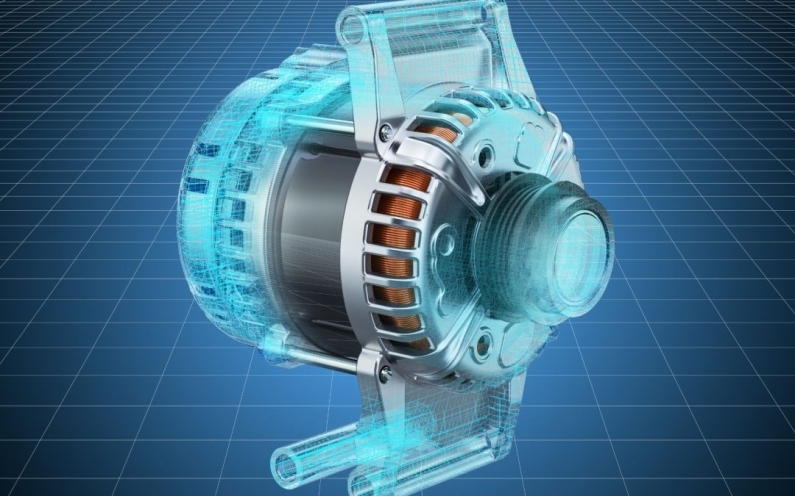
When you have a brilliant idea for a new product, you might think the next step is just getting it drawn on a computer. However, the world of product development is actually split into two very important paths: Industrial Design (ID) and Engineering CAD (Computer-Aided Design).
While they both use computers to create models, they focus on very different things. One cares about how a product looks and feels in your hand, while the other cares about how it works and stays together. If you are looking to turn your vision into a reality, understanding these differences is the secret to a successful launch. Let’s dive into the deep details of how these two worlds collide to create the products we use every day.
What is Industrial Design (ID)?
Think of Industrial Design as the soul and skin of a product. An industrial designer’s primary job is to make sure a product is attractive, easy to use, and fits the user’s lifestyle. They are the artists of the tech world, but their art has a purpose.
When you hold a sleek smartphone, use a kitchen gadget that fits perfectly in your palm, or sit in a comfortable office chair, you are experiencing the work of an industrial designer. They don’t just want a product to work; they want you to love using it.
The Core Pillars of Industrial Design:
- Aesthetics: This is the first impression. How cool or beautiful does it look? Does the color palette match the brand?
- Ergonomics: This is all about human factors. How does it fit the human body? Is it comfortable to hold for ten minutes? What about ten hours?
- User Experience (UX): Is it easy to understand how to turn it on? Designers study how people naturally move to ensure the buttons are in the right places.
- Emotional Connection: Good design makes you feel something. Whether it’s the rugged look of a power tool or the clean lines of a luxury watch, ID creates that feeling.
Industrial designers often start with hand sketches or organic CAD software. They want to create shapes that evoke emotion and make a customer want to buy the product off the shelf.
What is Engineering CAD?
Now, think of Engineering CAD as the skeleton and engine of the product. Once the designer decides how it should look on the outside, the engineer must figure out how to actually build it so it doesn’t break, melt, or fail.
Engineering CAD is all about extreme precision. In this world, there is no room for guessing. If a part is off by even a fraction of a millimeter, the whole product might fail to assemble, or worse, it could be dangerous for the user. Engineers use Parametric Modeling to ensure every screw, gear, and circuit board fits perfectly inside the shell created by the designer.
The Core Pillars of Engineering CAD:
- Functionality: Does the mechanism actually move? If it’s a folding chair, do the hinges rotate correctly without hitting the frame?
- Manufacturability: This is huge. Can a machine actually make this part? Engineers have to think about how plastic flows into a mold or how a drill bit cuts through metal.
- Durability and Safety: Will the product break if someone drops it? How much weight can it hold before it snaps? Engineers run digital stress tests to find out.
- Material Science: They decide if the product should be made of high grade aluminum, flexible silicone, or recycled plastic based on how those materials behave in the real world.
The Big Comparison: ID vs. Engineering CAD
To make it simple, let’s look at the main goals of each side in this easy-to-read table.
| Feature | Industrial Design (ID) | Engineering CAD |
|---|---|---|
| Primary Goal | How it looks and feels (The “Wow” factor) | How it works and lasts (The “How” factor) |
| Primary Focus | Human-centric (The User) | Tech-centric (The Machine) |
| Tools Used | Sketching, Rhino, Blender, Keyshot | SolidWorks, Autodesk Inventor, Fusion 360 |
| Main Concern | Style, Color, Comfort, Branding | Materials, Stress tests, Tolerances, Assembly |
| Outcome | A beautiful concept or visual prototype | A technical blueprint for the factory floor |
| Logic | Intuition and Emotion | Mathematics and Physics |
Why You Need Both for a Successful Product
You might be wondering, can’t I just pick one? The truth is, if you skip one, your product will likely fail in the marketplace. Here is why the balance is so critical.
1. The Pretty but Broken Problem
If you only focus on Industrial Design, you might end up with a gorgeous product that is impossible to manufacture. Imagine a car that looks like a futuristic bubble but has no room for an engine or wheels that can actually turn. In the business world, this leads to Scope Creep and wasted money because you have to pay engineers to fix a design that can’t be built.
2. The Functional but Ugly Problem
If you only focus on Engineering CAD, your product might work perfectly but look like a gray box from the 1980s. If it’s heavy, uncomfortable, or confusing to use, no one will want to buy it. No matter how perfect the internal gears are, if the outside doesn’t appeal to humans, it won’t sell.
The Solution: The best products happen when designers and engineers work together from. At X-ProCAD, we specialize in bridging this gap. We take your creative ideas and turn them into engineered designs that look amazing and are ready for the factory floor.
Deep Dive: Key Differences in the Design Process
The Design Language
Communication is different in these two fields. Industrial designers talk about form, flow, and texture. They want to create a brand identity. They might use 3D printing to quickly see if a handle feels right in their hand or if the light hits the surface in a pleasing way.
Engineers talk about tolerances, clearances, and structural integrity. They don’t care as much about the vibe of the light; they care if the light bulb generates too much heat for the plastic casing to handle. They run simulations to see if the plastic will melt or if the metal will bend under pressure.
The Software Differences
While there is some overlap, the software tools are built for different tasks:
ID Software (Surface Modeling): This is like digital clay. You can pull, stretch, and twist shapes until they look perfect. It is great for organic shapes like the curves of a sports car or a perfume bottle.
Engineering CAD (Solid Modeling): This is math based. If you change the diameter of a screw hole, the software automatically updates every other part of the design to match. It tracks every cubic millimeter of material to calculate weight and center of gravity.
How to Choose the Right Path for Your Project
If you are at the very beginning of your journey, you likely need a mix of both. Here is a step-by-step guide on how a professional project moves through these stages:
Phase 1: Concept (ID Focus)
Start here if you only have an idea. Don’t worry about the screws yet. Focus on the shape, the size, and who will use it. Use sketches and simple 3D shapes to show the vision.
Phase 2: Refinement (The Hand off)
This is the most critical stage. This is where the designer and engineer sit down together. They make sure the cool shape has enough internal volume to hold the batteries, circuit boards, and wires.
3: Development (Engineering Focus)
This is the technical stage. Every measurement is finalized to the thousandth of an inch. Materials are chosen specifically for their strength or cost. This is where the design becomes a digital master that a factory can read.
4: Prototyping and Testing
Now we build a real version! Prototyping 101 teaches us that this step is where you catch the most expensive mistakes. We use this to test two things:
Visual Test: Does it look like we imagined?
Functional Test: Does it work without breaking?
Making Your Vision Real
The journey from a sketch on a napkin to a product on a store shelf is exciting, but it requires different types of expertise. Industrial Design gives your product its personality and makes it human, while Engineering CAD gives it its strength, safety, and reliability.
By understanding the critical differences between these two fields, you can better plan your project and avoid expensive mistakes. Whether you need a beautiful 3D model to show investors or a high precision blueprint for a manufacturer, it’s all about finding the right balance between art and science.
Visit our website X ProCAD to see how our team of experts can help you navigate the entire journey. From initial CAD services and patent assistance to final manufacturing and fulfillment, we provide the technical power you need to succeed. To keep your content exactly as you wrote it while adding a natural place for your Contact Us link, you can insert it into your final call-to-action.



Recent Comments